




About Run 3
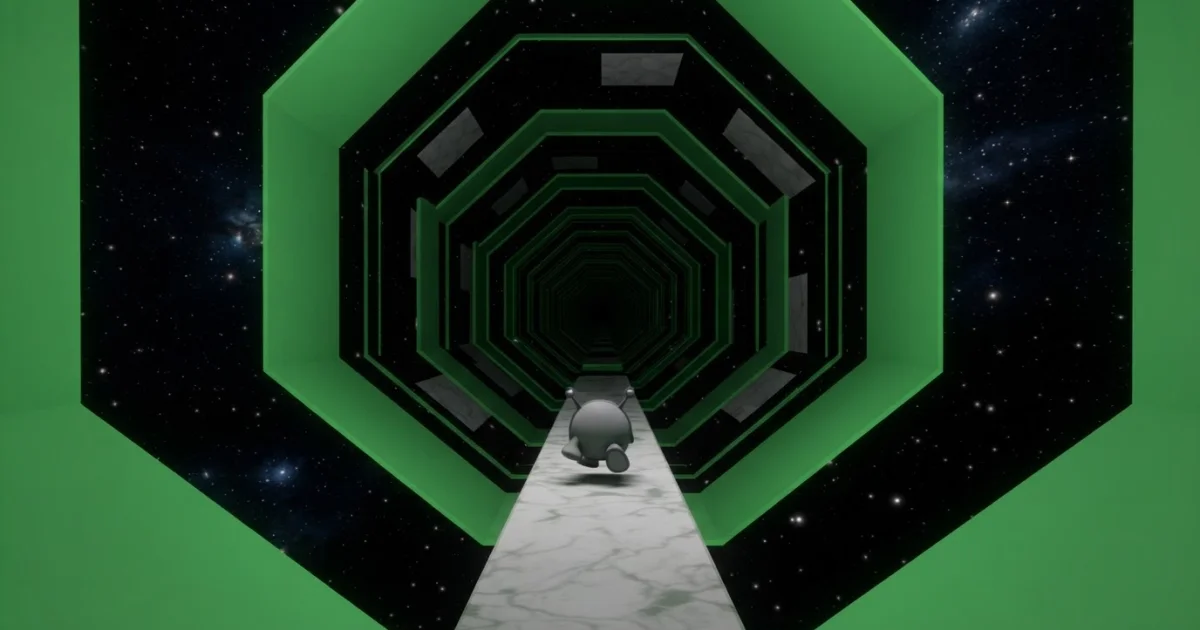
Run 3 is a captivating 3D runner game that challenges your reflexes and spatial awareness. You control a small alien navigating treacherous tunnels and outer space pathways. The goal is simple: don’t fall off the ever-shifting platforms as you run, jump, and even flip gravity to survive. This cool game offers a unique blend of speed and puzzle-solving in a cosmic setting.
What Is Run 3?
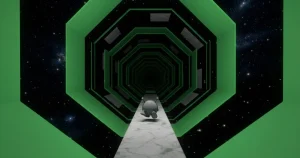
Run 3 is a popular space runner game where you guide a character through a series of increasingly complex 3D tunnels and pathways floating in space. The core mechanic involves running on any surface (floors, walls, and ceilings) by using gravity-defying jumps and flips. The game’s perspective shifts as you rotate the environment, creating a constant challenge to anticipate your next move and avoid falling into the void. It’s a test of quick thinking and precise execution, making every level a unique puzzle.
The Core Run 3 Experience
At its heart, Run 3 is a pure runner game. You’re constantly moving forward, and your main task is to react to the environment. The 3D graphics make the space tunnels feel vast and disorienting in the best way possible. Each level introduces new obstacles and platform configurations, pushing you to adapt your strategy on the fly.
Navigating the Tunnels
The game’s signature feature is its ability to run on all surfaces. When you jump towards a wall, your character will land on it, and the camera will rotate, making that wall your new floor. This mechanic is crucial for traversing gaps and avoiding broken sections of the path. Mastering this “gravity flip” is key to progressing through the many levels.
Game Modes
Run 3 offers two distinct game modes to keep things fresh. The main “Explore” mode takes you through a linear progression of levels, each with its own design and challenges. The “Infinite” mode, on the other hand, is a test of endurance, where you run as far as you can through a procedurally generated tunnel, aiming for high scores. You’ll feel like you’ve run for miles as you conquer each new path, pushing your limits towards infinity.
Characters and Power Cells
As you play, you’ll encounter various characters, each with unique attributes that can subtly change how you approach certain levels. These characters, along with new paths and tunnels, are often unlocked using “power cells,” which you collect during your runs. Collecting enough power cells allows you to access new content and expand your gameplay options. The game offers a glimpse under the hood of 3D runner mechanics, revealing its intricate design.
How to Play Run 3
Playing Run 3 is straightforward, but mastering its gravity-defying mechanics takes practice. The objective is always to keep your character running and avoid falling off the platforms. You’ll need to use quick reflexes to jump over gaps, navigate around obstacles, and strategically flip your perspective to find safe paths. The game requires a certain level of spatial reasoning, almost like a fun math puzzle.
Run 3 Controls
If you’re playing on a web browser, you’ll use your keyboard. Use the Left and Right Arrow keys or A and D keys to move your character left and right. Press the Spacebar or Up Arrow key to jump. Holding the jump button down will make your character jump further, which is essential for clearing large gaps. For smaller adjustments and precision, short taps of the jump key are more effective. You can monitor your progress through the levels.
For mobile play, the game uses intuitive on-screen controls. You’ll find virtual buttons or swipe gestures to control movement and execute jumps, allowing for a smooth experience on touch devices.
Browser Compatibility
Run 3 is designed to run smoothly directly in your web browser. You can enjoy the game without any downloads on popular browsers like Chrome, Edge, and Firefox, ensuring a consistent and responsive experience. It’s a great site to play on.
Tips and Tricks for Run 3
Here are some concrete tips to help you master the challenging space tunnels of Run 3:
- Master the Jump Timing: A short tap of the jump key is perfect for small gaps or precise landings, while holding it down gives you maximum distance for those huge abysses.
- Use Gravity to Your Advantage: Don’t be afraid to jump onto walls or ceilings. The game is designed for this, and often the safest path involves flipping your perspective to a new surface.
- Observe Before You Leap: Take a moment to look ahead, especially in new levels. Identifying patterns in the broken paths and moving platforms will help you plan your route.
- Experiment with Characters: Different characters have slightly different physics or abilities. If you’re stuck on a particular level, try switching characters to see if a different playstyle helps you overcome the obstacle. While no character is truly invincible, mastering the controls makes you feel unstoppable, almost like a nike athlete with zoomx shoes. Launch yourself into jumps with the force of a cannonball!
- Practice Precision over Speed: While it’s a runner game, sometimes slowing down your reactions slightly to ensure a precise jump or movement is more effective than rushing and falling. Each new level feels like entering a new speed zone.
Where to Play Run 3
You can play Run 3 right now, free, directly in your browser on Firewaterduo.com. No downloads or installations are needed; just open your browser and start running through space. It’s a great game to pick up for a few minutes any day. Players of all ages, men and women alike, find the challenge of Run 3 engaging.
Also available on the App Store for iOS.
Also available on Google Play for Android.
Exploring Run 3’s Depths
Players often have specific questions about the game’s progression and hidden elements. Here are some common inquiries about Run 3:
How many levels are in Run 3?
Run 3 features a substantial number of levels across its various tunnels and pathways in the main Explore mode. The exact count can vary as new paths are discovered, but players will find many hours of content to conquer. How long does it take to complete them all? That depends on your skill and time commitment.
How to get power cells in Run 3?
Power cells are the in-game currency used to unlock new characters and pathways. You primarily collect power cells by simply playing the game; they are scattered throughout the levels in both Explore and Infinite modes. Keep an eye out for them as you run!
How to get the Angel in Run 3?
The Angel is one of the unlockable characters in Run 3. To get the Angel, you typically need to progress through specific levels in the Explore mode and collect a certain amount of power cells. Keep playing and exploring new tunnels to eventually unlock this character.
Where is the wormhole in Run 3?
Wormholes in Run 3 serve as shortcuts or gateways to different areas and tunnels within the game. They are usually found after completing specific sets of levels or by discovering hidden paths. Keep an eye on the environment for unusual glowing portals or anomalies that might indicate a wormhole’s presence.
For Parents
Run 3 is a browser game focused on skill and reflexes. It involves guiding a character through a 3D space environment, avoiding falls and navigating obstacles. There is no violent content, inappropriate language, or social interaction elements. It’s a challenging but safe experience suitable for children, promoting hand-eye coordination and spatial reasoning.
Other Great Runner Games
If you enjoy the fast-paced, reflex-testing action of Run 3, here are some other runner games you might like: